
Vitrio. Stock, purchasing and daily work, connected for your laboratory.Security & access
Illustrative laboratory team reviewing stock and usage charts beside reagent analysers
Vitrio · Laboratory operations

Lab stock and purchasing.
All together in Vitrio.

Manage your lab’s stock, purchasing and daily work. Follow reagent usage, review stock needs and coordinate purchasing alongside your existing clinical system.

30-minute walkthrough · No credit card

Watch the launch film ↗
Stock & lotsPurchasing workflowsQuality recordsOperational insights

Keep your laboratory moving.
See the stock decisions ahead.

A clearer view of your operations, with your team in control.

Vitrio operational intelligence

Understand your stock.
Plan your next move.

Bring stock history and purchasing decisions into one operational picture.

Vitrio
How the work connects

From reagent usage to a reviewed purchase.

Three connected steps, with your team making the decisions.

  1. 01

    Record reagent usage

    Log completed test activity against configured reagent recipes. Follow the associated stock usage and review lot records.

    See test consumption ↗
  2. 02

    Review stock needs

    Check usable stock, expiry information and purchasing needs. Review the available evidence before deciding what to request.

    Explore stock oversight ↗
  3. 03

    Approve purchasing

    Raise the request, review suppliers and route it through the appropriate approval workflow. A recommendation is not a purchase commitment.

    Follow the purchasing workflow ↗
Clear requisitions

Turn a stock need into a reviewed request.

Keep quantities, supporting evidence and the purchasing decision together.

Explore procurement ↗
Connected consumption

Completed work. A clearer reagent record.

Map test activity to reagent usage with a traceable operational record.

Explore consumption ↗
Controlled access

The right access for the right role.

Keep operational decisions within your team’s authorised workflows.

Review security ↗
Stock visibility

Follow your stock from batch to bench.

Bring quantities, locations and expiry information into view.

Explore inventory ↗
Decision support

Make room for the decisions that matter.

Review operational insights alongside the evidence and available history.

Explore insights ↗
Explore the workspace

See the work.
Follow every step.

Explore real Vitrio screens, then try the illustrated purchasing workflow below. Demonstration data only.

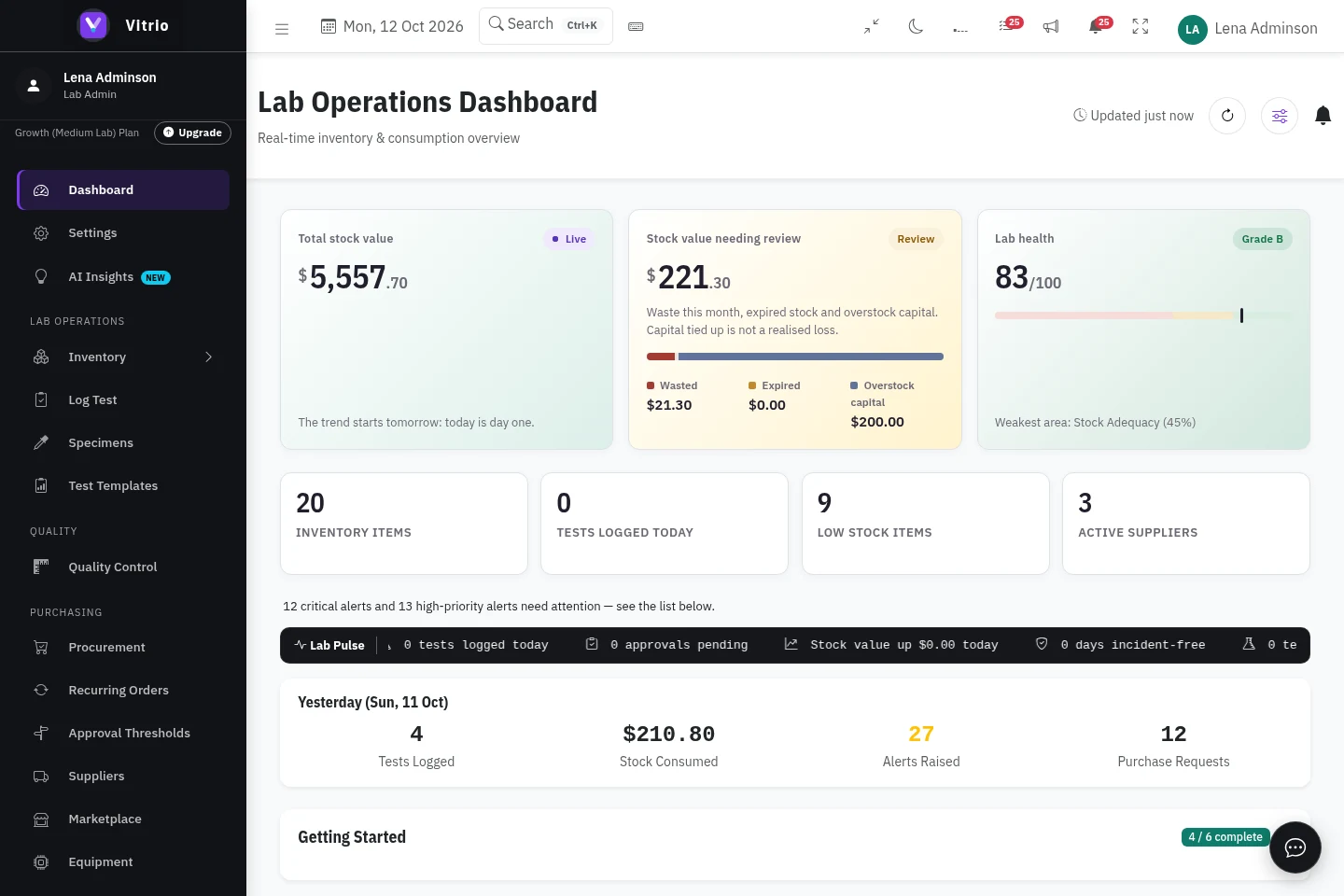
Vitrio dashboard showing stock value, low-stock items, suppliers and operational alerts in a demonstration laboratoryView the actual dashboard
Actual Vitrio application · Demonstration data · Screenshots are not interactive controls
Vitrio
Stock overviewLaboratory inventory
Items in stock120 items
FBC reagent24 packs availableIn stock
Sample tubes8 boxes availableReview stock
Overview Stock Requests
Inventory · Example data
Vitrio
PurchasingYour team's requests
Awaiting review3 requests
FBC reagentPR-104 · 4 packsIn review
Nitrile glovesPR-105 · 10 boxesOrdered
Overview Stock Requests
Purchasing · Example data

Your operational overview, in one place.

Make the record useful

From completed work
to the next stock decision.

See how an example reagent recipe connects activity to usage. Quantities are illustrations, not a customer result.

Connection planning

Your existing tools.
A connected operational view.

Connection methods depend on the source and approved setup. A real LIS pilot needs authorisation, mappings and reconciliation.

VitrioOperational workspace
ValidateMapReviewReconcile
CSV exportsActivity eventsStock recordsApproved sources
Approved sourceValidated activityOperational record

Architecture illustration · Not a list of active vendor connections

Review connection options
Follow every batchStock, locations and expiry dates
Connect tests to stockTrack the reagents your work uses
Keep purchasing clearRequests, approvals and suppliers
Review the recordQuality workflows and audit history
Connected by design

Your laboratory’s work.
Connected around Vitrio.

Follow stock from the tests that use it to the decisions that keep your laboratory moving. Inventory, purchasing, suppliers and insights share one operational picture.

  1. 01Log a test
  2. 02Follow reagent usage
  3. 03Review the next stock decision
Explore the platform
Who It's For

Built around the work your laboratory does

For diagnostic, hospital and reference laboratory teams managing reagents, purchasing and quality alongside their existing clinical systems.

Owners & lab managersTechnicians & storekeepersProcurement & financeQuality leads
Everything Included

One system for everything inventory touches

Illustrative product screens · Example data
The people behind the work

A shared view. A clearer next step.

Connect the everyday decisions that keep your laboratory moving.

Product demonstration · Not a customer testimonial

From a stock question to a purchasing decision.

In this demonstration laboratory, the team can review the dashboard’s low-stock indicators, inspect inventory records and open the purchasing workspace. These are captures of the actual application, using synthetic records.

See how the workflow fits your team before judging its impact. No customer savings or performance results are claimed here.

Walk through it with us
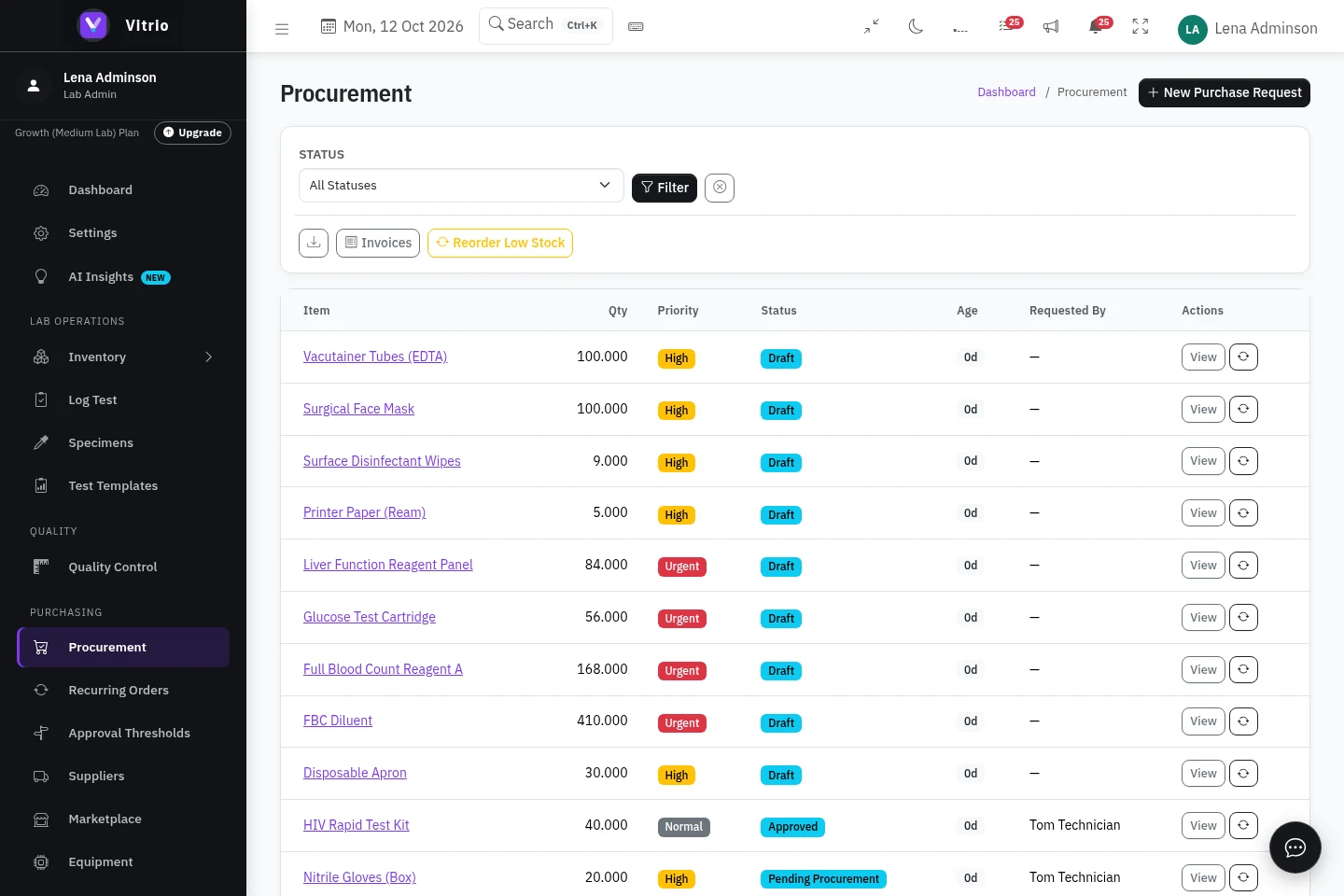
Actual Vitrio procurement workspace displaying demonstration purchasing records
Actual application · Demonstration data
Laboratory operations

Know what is ready to use.

Review stock, batches and expiry dates alongside the tests that consume your reagents. Give the next shift a clear starting point.

Explore inventory
Purchasing teams

Put the request in context.

Bring purchasing requests, approvals and supplier workflows together. Review the stock position before deciding what to order.

Explore purchasing
Quality leads

Keep the follow-up visible.

Organise quality and equipment records alongside operational work. See the outstanding actions and who is responsible for them.

Explore quality workflows
See it with your team

A walkthrough of your
laboratory’s daily work.

Tell us how your team manages stock, tests and orders. We’ll show the relevant workflows and answer your questions about setup and pricing.

Arrange a walkthrough
A useful 30 minutes
01

Start with your day. Tell us how you track stock, log tests and place orders.

02

Follow a real workflow. See a logged test, the reagent deduction and the next stock decision.

03

Leave with clear next steps. Discuss pricing, your existing inventory and what setup would involve.

Please use sample information. There’s no need to share patient records or confidential laboratory data.
Built for real regulators

Compliance that follows your country

Choose where your laboratory operates. Checklists, registrations and prices follow.

Privacy documentationDocumentation to support your privacy review
MLSCN / SLIPTA checklistWHO-AFRO self-assessment, scored in the app
NAFDAC trackingRegistration numbers tracked per inventory item
Purchasing and receiving recordsApproved requests, inspected deliveries and invoice checks

Compliance content adapts to your laboratory's country once your company is set up.

Security & access

A clear starting point for your IT review.

Understand how access and accountability work before bringing your team on board.

01

Company workspaces

Company-scoped records keep laboratory work organised within its workspace.

02

Role-based access

Different responsibilities have different permissions, enforced by the application.

03

Audit history

Review recorded activity, including sign-ins, exports and permission denials.

04

Sign-in protection

Repeated failed sign-in attempts are monitored and subject to lockout controls.

Explore security and access controls
Integrations

Keep using the tools your team knows

Explore supported connections for alerts, exports and operational activity, directly or through automation tools. Real LIS connections need an authorised source, approved mappings and reconciliation before activation.

VitrioYour laboratory workspace
SlackDiscordGoogle ChatZoho CliqZapiern8n

Connection options vary by tool. Some workflows use automation services; review the integration guide for setup requirements.

Available methods

CSV, API & signed webhooks

Use documented exports and connection methods for permitted operational workflows. Access and configuration requirements apply.

Review API documentation ↗
Setup required

Automation tools

Connect through webhook or API workflows. Native listed apps and direct accounting connectors are planned; they are not preconfigured integrations.

Check supported methods ↗
Authorised pilot required

Your laboratory’s LIS

Confirm the vendor and interface, approve nonclinical activity fields, map recipes and reconcile stock before enabling a real connection.

Discuss your LIS ↗
  • Slack
  • Discord
  • Google Chat
  • Zoho Cliq
  • Zapier
  • n8n
  • Zoho Flow
  • Xero
  • Zoho Books
  • SharePoint
  • Airtable
  • Asana
  • Salesforce
  • Microsoft Excel
  • Google Calendar
  • Apple Calendar
  • Google Workspace
  • Microsoft Teams
  • Telegram
  • WhatsApp
  • Mattermost
  • Make
  • IFTTT
  • QuickBooks
  • Sage
  • Odoo
  • Notion
  • Trello
  • HubSpot
  • Google Sheets
  • Power BI
  • Outlook Calendar
  • Microsoft 365
Take a self-guided tour

One reagent. A whole day of decisions.

Click through a stock-to-purchasing example. See what changes, who reviews it and what stays in the record. No signup needed.

VitrioOperational workspaceInteractive example · Synthetic data
Storekeeper viewUsable stock

Know what is ready to use.

Quantity is only useful when the lot is usable. Expired and quarantined stock stays out of this example’s available balance.

LotQuantityStatus
ALT · Example lot A100.00 mLUsable
Example lot B20.00 mLExpired · excluded
Explore stock and lot controls
Operational data only. Your clinical records stay in your LIS.Walk through your workflow with us
What will we cover in your demo?
  • How your team tracks stock, batches and expiry dates.
  • How tests connect to reagent usage and purchasing.
  • Setup requirements, account roles and the plan for your laboratory.
Plans & pricing

Every tier runs the full platform

Tiers scale with your company's size, not with which features you're allowed to use.

Starter

from $99/month
  • Full platform, single branch
  • Up to 6 role-based accounts
See Details

Enterprise

Custom quote
  • Multi-branch hierarchy
  • White-labeling available
See Details

Naira and GBP pricing also available. See the full pricing page for currency options and the full comparison matrix.

Quick Questions

Before you book a demo

No. Booking a demo just opens a short request form. No card, no commitment.

Yes. Access controls scope laboratory records to the appropriate workspace. Shared account relationships and authorised platform administration are described in our security documentation. See the Security & Trust page for the details.

Yes, via bulk CSV import, with no manual re-entry of every item.

No. Vitrio is a responsive web app that works fully on desktop, tablet, and phone. No app store download required.

Companies are provisioned directly by the Vitrio team. No self-serve signup form to fumble through. Book a demo and we'll set your company up.

An African focus

Your laboratory. Your country.
A clearer operational day.

Explore stock, purchasing and quality workflows with Vitrio. Start with a walkthrough built around your laboratory’s needs.

Explore by country

Nigeria

Your stock and purchasing workflow, connected.

Hover over a glowing point, or select a country below. On mobile, tap a point to explore.

Discuss your laboratory

Points identify countries for exploration, not office or customer locations. Availability and setup are confirmed with our team.

Country-specific availability and setup are confirmed during your walkthrough.

A modern diagnostic laboratory
SlackDiscordGoogle ChatZoho CliqZapiern8n

See how Vitrio fits your laboratory

Explore the product at your own pace, or book a 30-minute walkthrough of your laboratory’s stock and purchasing needs. No credit card required.